
UIStateManager is a component that handles showing and destroying UIs based on what requested the UI to be shown. It is only one possible solution to this problem and is being provided as an example of a way to centralize and decouple the display of UIs from components that need UI displayed.
The core idea behind UIStateManager is that components will ask it to display UI instead of creating and displaying UI themselves. A component that needs to display some UI should get a reference to the UIStateManager in the scene, and call ShowUIFor when it needs to show UI, passing itself and the object to use as a data context for the UI as arguments. With UIStateManager if ShowUIFor is called when there is already an open UI, the currently open UI will be hidden so that there is only one visible UI at a time. UIStateManager handles the creation of the UI objects and will assign the data context to the top level Bindable component if it exists.
There are two ways to close a UI with UIStateManager. CloseUIFor will close the UI that was opened when ShowUIFor was called with the same MonoBehaviour argument. CloseUI takes the Transform of the UI that should be closed as an argument. After a UI is closed, UIs that were hidden by multiple ShowUIFor calls will be shown again in the reverse of the hiding order.
UIStateManager also has two events: UIOpened is fired whenever a UI is opened and UIClosed is fired whenever a UI is closed. UIOpened is an Action<MonoBehaviour, Transform> which means that any void method with a MonoBehaviour and a Transform argument can be attached to it. It will be called with the MonoBehaviour used to show the UI and the root Transform of the shown UI. UIClosed is an Action<MonoBehaviour> and will be called with the MonoBehaviour used to open the UI.
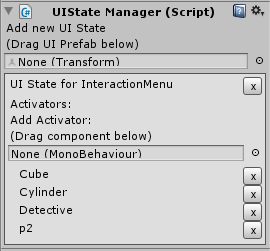 UIStateManager should be added to the top level Panel of the NGUI UI because it creates all requested UIs as children. To create a new managed state, drag the UI Prefab into the box under “Add new UI State”. This will create a box representing the State, where activators for that State can be added. Activators can be added to a State in the same way that a State is created, just drag the MonoBehaviour that ShowUIFor will be called with into the box under “Add Activator.” Activators can be removed from the State by clicking the ‘x’ on the right side of the State box. States can be removed by clicking the ‘x’ in the upper right of the State box.

